
The Real Cost of a Server Going Dark
Let me be direct: a website that goes down costs money. Not just in sales lost during the outage, but in trust that takes weeks to rebuild. For high-traffic websites, E-Commerce stores, SaaS platforms, media portals, financial dashboards, every minute of unavailability has a dollar figure attached to it.
According to Gartner research, average IT downtime costs organizations around $5,600 per minute. For large enterprises, that number climbs much higher. Even smaller businesses feel it: a local store running flash sales or a news site spiking during a breaking story cannot afford the moment their server decides to buckle.
The conversation around dedicated server downtime is not just technical. It is a business continuity argument. And it starts with understanding why downtime happens in the first place, and what infrastructure choice actually fixes it.
- Dedicated servers reduce downtime with exclusive hardware resources.
- Shared and VPS hosting struggle during traffic spikes.
- Bare metal servers deliver stable performance under heavy load.
- RAID, DDoS protection, and monitoring improve uptime reliability.
- Dedicated hosting gives full control over server resources and configurations.
- For high-traffic businesses, downtime costs more than dedicated hosting
Why Shared and VPS Hosting Fail Under Traffic Spikes
Most websites start on shared hosting. It is cheap, quick to set up, and works fine when traffic is predictable and low. The problem shows up the moment anything unusual happens, a product launch, a viral article, a seasonal sale.
On shared hosting, your website competes for CPU, RAM, and bandwidth with dozens of other sites on the same physical machine. When one site gets a traffic surge, everyone on that server suffers. Load times spike. Requests queue up. In the worst cases, the server crashes entirely.
Cloud VPS hosting sits a step above that. Your resources are isolated through virtualization, so a noisy neighbor does not steal your RAM. But VPS environments still run on shared physical hardware, and virtualization overhead means you are never getting 100% of what the machine can deliver.
Dedicated servers cut through both problems. You get an entire physical machine, no virtualization, no neighbors, no competition for resources.
What a Dedicated Server Actually Does for Uptime
Exclusive Hardware Access
A bare metal server is exactly what it sounds like: a physical machine assigned entirely to your account. Every CPU core, every gigabyte of RAM, every storage drive, all of it belongs to your workload alone.
This matters for uptime in a specific way. On shared infrastructure, a memory leak from another tenant’s application or a DDoS targeting a different site can drag down your server’s performance. On a dedicated server, that risk does not exist. Your website’s availability is not tied to what anyone else is doing.
Predictable Performance Under Load
High-traffic websites do not just need raw power. They need consistent power. A checkout page that loads in 1.2 seconds at midnight needs to load in 1.2 seconds during a Black Friday surge with 40,000 concurrent users.
Pakistan-based dedicated servers from Nexus use Dell and HP Gen 11/12 hardware with DDR4 RAM, designed to hold performance under sustained load. When you configure a server for your specific traffic profile, not a generic “medium traffic” template, you get headroom that protects you when spikes arrive.
No Hypervisor Overhead
VPS servers run a hypervisor layer between your workload and the physical hardware. This layer manages resource allocation across virtual machines. It is efficient, but it introduces latency and limits how much of the hardware you can truly utilize.
With a bare metal dedicated server, your application talks directly to the hardware. Database queries resolve faster. Web server processes handle more concurrent connections. Page generation times drop. Each of those improvements compounds into fewer request timeouts and better uptime under stress.
How Dedicated Servers Handle the Most Common Causes of Downtime
Traffic Spikes
Shared environments fall over when traffic doubles unexpectedly. A dedicated server, sized correctly, has reserve capacity built in. You are not running at 95% utilization on a normal Tuesday, you are running at 40-50%, which means the spike that would kill a shared server barely registers on yours.
Nexus’s Cloud VPS and Dedicated Server packages are built with this buffer in mind. The key is choosing a plan that gives you room to absorb demand rather than one that barely handles current traffic.
Hardware Failure
No server lives forever. Drives fail, memory modules go bad, network cards malfunction. The question is not whether hardware will fail, but what happens when it does.
On a dedicated server, you control the hardware refresh cycle. With a provider that maintains server hardware and offers add-ons like additional storage and RAM, you can replace aging components proactively rather than reactively. You can also configure RAID storage arrays, so a single drive failure does not bring down your site, the array keeps running on the remaining drives while you replace the failed one.
DDoS Attacks
Distributed denial-of-service attacks flood a server with fake traffic until it cannot process legitimate requests. Shared servers are particularly vulnerable because the attack impacts everyone on the machine, not just the target.
Dedicated servers can be paired with anti-DDoS hardware and traffic scrubbing services. When an attack hits, malicious traffic is filtered before it reaches your server. Legitimate visitors continue to get through. This combination, dedicated hardware plus DDoS protection, is why enterprises and financial platforms choose bare metal over cloud shared environments for availability-critical workloads.
Misconfigured Resource Limits
On shared and VPS hosting, providers set resource limits to protect other customers. If your site exceeds its PHP memory limit or connection pool, requests fail. You have limited ability to change those limits because they affect the entire shared infrastructure.
On a dedicated server, you set the limits. If your application needs 16GB of RAM allocated to MySQL, you configure it that way. If you need to raise the maximum number of simultaneous database connections, you do it. There is no approval process, no waiting for a support ticket, no compromise.
International Dedicated Servers: Uptime Across Geographies
For businesses serving audiences across multiple regions, latency and redundancy become as important as raw uptime percentage. A server sitting in Pakistan serves Pakistani visitors well. But if 40% of your traffic comes from Europe or North America, those visitors experience slower load times, which degrades their experience and hurts conversion rates.
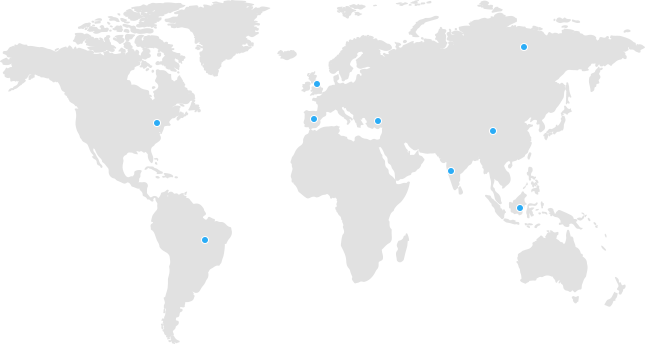
International dedicated servers from Nexus are hosted in Tier III, SOC Type II, and HIPAA-compliant data centers across multiple regions. Tier III certification means the facility has 99.982% uptime guarantee baked into the infrastructure level, redundant power, cooling, and network paths. Your server sits inside an environment designed specifically to stay online.
The combination of region-specific hosting and enterprise-grade data centers means your dedicated server downtime risk is managed at every layer, from the physical facility to the network path to your application stack.
Dedicated Server vs. Cloud: The Uptime Argument
Cloud infrastructure is sold on availability. Auto-scaling, multi-zone redundancy, self-healing workloads, all of it sounds compelling. And for some use cases, cloud is the right answer.
But cloud environments introduce their own failure modes. If you are not an infrastructure engineer, configuring cloud auto-scaling correctly is genuinely difficult. Misconfigured scaling policies either fail to kick in when needed or trigger incorrectly and generate runaway costs. Multi-zone redundancy requires your application to be architected for it from the ground up.
A dedicated server is simpler. You know exactly what hardware you have. You know its performance profile. You can test it, stress test it, monitor it, and tune it. For many high-traffic websites, a well-configured dedicated server provides better practical uptime than a poorly configured cloud setup at a fraction of the complexity.
If you want to understand where each solution fits, Nexus has a useful breakdown on VPS hosting vs. dedicated hosting that walks through the performance and cost tradeoffs in plain terms.
Monitoring and Proactive Downtime Prevention
Having a dedicated server does not make you immune to problems. What it does is give you full access to configure monitoring that catches issues before they become outages.
On a dedicated server, you can:
- Set up server-level monitoring for CPU usage, memory pressure, and disk I/O
- Configure alerts that fire before resource utilization hits critical thresholds
- Run automated health checks on your database and application stack
- Schedule preventive maintenance windows during low-traffic periods
Nexus provides monthly network statistics on request, which gives you visibility into traffic patterns that can inform your capacity planning. Knowing that your traffic reliably doubles on weekends, for example, lets you configure performance tuning specifically for that pattern rather than reacting after the fact.
Choosing the Right Dedicated Server Configuration
Not every dedicated server is the right fit for every workload. Picking one that is underpowered relative to your traffic means you are back in the same position as shared hosting, running at capacity with no buffer. Picking one that is massively over-specced wastes money.
The right approach is to profile your actual workload:
Traffic volume. How many concurrent users do you handle at peak? What does your traffic look like in 6 months based on current growth?
Application type. A WordPress blog with heavy caching needs different specs than a real-time auction platform or a video streaming service. Database-heavy applications need fast NVMe storage and high RAM. CPU-intensive workloads need multi-core processors with high single-thread performance.
Geographic audience. Where do your users sit? A Pakistan-based audience is best served from a Pakistan-based dedicated server for minimum latency. A global audience benefits from international hosting in multiple regions.
Growth headroom. Buy for where you will be in 12 months, not where you are today. Nexus lets customers upgrade RAM and storage as requirements grow, but migrating between server classes takes time and planning, so building in headroom upfront is cleaner.
FAQs
What is dedicated server downtime and why does it happen?
Dedicated server downtime refers to periods when a server hosting your website is unavailable, making your site inaccessible to visitors. Common causes include hardware failure, software crashes, network outages, DDoS attacks, and resource exhaustion from traffic spikes. Unlike shared hosting where multiple sites share one machine, a dedicated server gives you exclusive hardware, which eliminates many of the neighbor-related causes of downtime, though it does not make you immune to hardware failure or network issues.
How much uptime can I expect from a dedicated server?
Most enterprise-grade dedicated server providers offer 99.9% uptime SLAs at minimum, which translates to roughly 8.7 hours of allowable downtime per year. Tier III data centers where providers like Nexus host international dedicated servers carry a 99.982% facility-level uptime guarantee, which reduces downtime exposure further. Your actual uptime also depends on how well your application and server are configured, a guarantee from the hardware provider does not protect you from application-level failures.
Is a dedicated server better than cloud hosting for uptime?
It depends on how each is configured. A well-managed dedicated server with proper monitoring, RAID storage, and DDoS protection often delivers more consistent uptime for predictable high-traffic workloads than a poorly configured cloud environment. Cloud infrastructure offers automatic failover advantages if your application is architected for it, but that architecture is non-trivial. For websites that do not require multi-region active-active redundancy, a dedicated server is frequently the simpler and more reliable choice.
What is the difference between managed and unmanaged dedicated servers?
With an unmanaged dedicated server, you are responsible for the operating system, software, security patches, and configuration. With managed dedicated hosting, the provider handles those layers for you. Managed hosting costs more but significantly reduces the operational burden and the risk of downtime from misconfigured software. For teams without a dedicated sysadmin, managed hosting is worth the additional cost.
Can I upgrade a dedicated server if my traffic grows?
Yes, though it is not instantaneous. Most providers, including Nexus, allow you to add RAM and storage to an existing dedicated server as add-ons. Upgrading to a higher-tier hardware configuration typically requires migrating your data to a new server, which involves planned downtime. The best approach is to provision slightly more capacity than your current traffic requires, so you have time to plan an upgrade before you run out of headroom.
How does RAID protect against dedicated server downtime?
RAID (Redundant Array of Independent Disks) mirrors or distributes data across multiple physical drives. In a RAID 1 configuration, for example, every write to one drive is simultaneously written to a second drive. If one drive fails, the server keeps running on the surviving drive with no interruption to your website. RAID does not protect against all failure modes, it is a disk-level redundancy mechanism, not a full disaster recovery solution, but it eliminates the most common hardware failure scenario (single drive failure) as a cause of downtime.
What happens to my website during a DDoS attack on a dedicated server?
Without DDoS protection, a volumetric attack floods your server’s network interface with more traffic than it can process, making your site inaccessible to legitimate visitors. With DDoS mitigation in place, malicious traffic is identified and filtered at the network edge, before it reaches your server. Nexus’s dedicated server infrastructure includes anti-DDoS hardware and advanced security technologies. During an attack, your server continues serving real visitors while the attack traffic is discarded.
The Bottom Line
Dedicated server downtime is not inevitable. It is, to a significant degree, a product of infrastructure decisions made before the outage happens. High-traffic websites that run on bare metal hardware, sized correctly for their traffic, with proper monitoring and DDoS protection, simply go down less often than those crammed onto shared servers with no headroom.
That is not a marketing claim. It is a function of how the hardware works. You own the machine. Nobody else’s traffic can consume your resources. You set the configuration. You control the performance profile.
For businesses that depend on their website staying online, E-Commerce, media, finance, SaaS, the math on dedicated hosting is usually straightforward. The cost of one significant outage in lost revenue and customer trust often exceeds months of dedicated server fees.
View Nexus dedicated server packages to find a configuration matched to your traffic profile and geographic audience. Pakistan-based and international options are both available, with Tier III data center infrastructure and 24/7 technical support.
Nexus Technologies has served businesses worldwide since 1998, providing dedicated hosting, cloud VPS, domain registration, and web development services from data centers in Pakistan, the US, and Germany.